LocalNode
How it worksDemoAppsPricingFAQShop now
← All guides
Home/Community/Configuring Prowlarr Indexers

Configuring Prowlarr Indexers

Media
Beginner
5 min read
Published: May 7, 2026

Was this helpful?

Help us improve our community guides.

In this guide

  • Overview
  • Step 1: Adding Indexers
  • Step 2: Syncing to Radarr and Sonarr
  • Step 3: Testing the connection
  • Next Steps

Need direct help?

LocalNode Care Plan members get priority remote support.

Email Support →

More in Media

Adding Your Movie and Tv Collection to Jellyfin

Adding Your Movie and Tv Collection to Jellyfin — Step-by-step guide for your LocalNode.

5 min read

Automating Subtitles with Bazarr

Automating Subtitles with Bazarr — Step-by-step guide for your LocalNode.

5 min read

Best Jellyfin Plugins to Install

Best Jellyfin Plugins to Install — Step-by-step guide for your LocalNode.

5 min read
LocalNode

Plug-and-play home server. Your data, your hardware, your rules.

Product

How it worksDemoAppsCommunityPricingFAQ

Support

ContactShipping & ReturnsTrack Order

Legal

Privacy PolicyTerms of ServiceShipping Policy
© 2026 LocalNode. Built for people who value their privacy.Denton, TX · hello@localnode.tech

Prowlarr is the central search engine that feeds data to Radarr and Sonarr. Instead of manually configuring 10 different search sites in multiple apps, you configure them once in Prowlarr, and it automatically pushes them out.

Overview

An "Indexer" is a website that contains a database of magnet links. Prowlarr connects to these indexers. When Radarr wants a movie, it asks Prowlarr. Prowlarr searches all your indexers simultaneously and sends the best results back to Radarr.

Step 1: Adding Indexers

  1. Open the Prowlarr app from your LocalNode dashboard.
  2. Go to Indexers in the left menu.
  3. Click Add Indexer.
  4. You will see a massive list of hundreds of sites. Some are Public, some are Private (require an invite and API key).
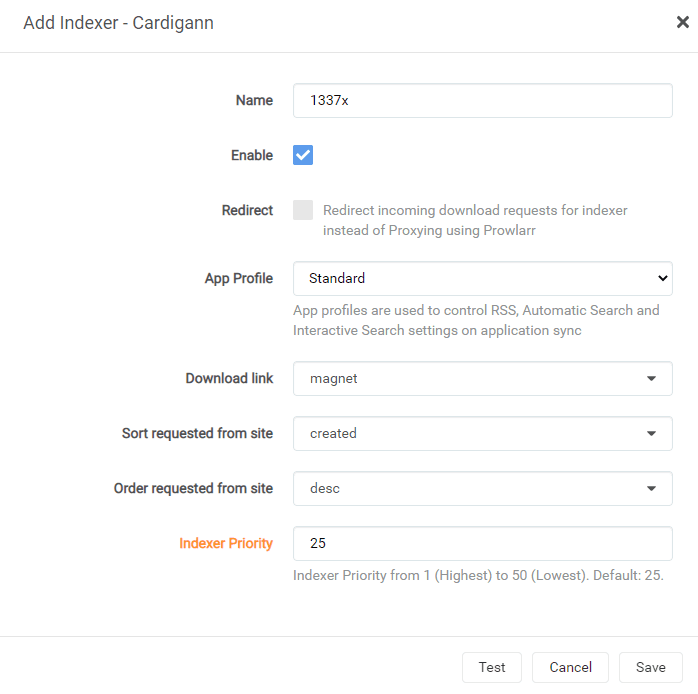
  5. Search for a public indexer (e.g., 1337x or RARBG if available).
  6. Click on the indexer. A configuration window will open. Leave the defaults and click Test.
  7. If you get a green checkmark, click Save.

Add 3 or 4 reliable public indexers. Do not add 50; it will slow down your searches drastically.

⚠️ Warning: Public indexers frequently change their URLs or go down. If searches stop working, open Prowlarr and check the status of your indexers. If one is red, it may be dead.

Step 2: Syncing to Radarr and Sonarr

Now we must tell Prowlarr to push these search engines into Radarr and Sonarr.

  1. In Prowlarr, go to Settings > Apps.
  2. Click the large + button under Applications.
  3. Click Radarr.
  4. Prowlarr Server: Type http://prowlarr:9696 (the internal docker name).
  5. Radarr Server: Type http://radarr:7878.
  6. API Key: You need Radarr's API key. Open Radarr in a new tab, go to Settings > General, copy the API key, and paste it here.
  7. Click Test, then Save.

Repeat this exact process for Sonarr:

  • Sonarr Server: http://sonarr:8989
  • Get the Sonarr API key from Sonarr's General settings.
Prowlarr indexer configuration dialog demonstrating sync settings toward Radarr or Sonarr.
Servarr wiki screenshot (wiki.servarr.com), bundled with Servarr/Wiki alongside GPLv3 Radarr/Sonarr/Prowlarr releases.

Step 3: Testing the connection

Once saved, Prowlarr will immediately "Sync" with the apps.

  1. Go back to your Radarr tab.
  2. Go to Settings > Indexers.
  3. You should magically see all the indexers you added in Prowlarr appear here, marked with a "Prowlarr" tag.

Your automated media setup is now complete! Radarr has a root folder to save to, a download client to fetch the files, and indexers to search. Try adding a movie!

Next Steps

  • Setting up Bazarr to automatically download subtitles for your media

Need help? Email hello@localnode.tech or visit localnode.tech/contact.